Free Printable To Do List: How to Build a Simple Daily System With Just One Page
It’s 7:42 a.m. My coffee’s already gone lukewarm because I got pulled into answering a “quick” work email that was not, in fact, quick. There’s a permission slip somewhere on the kitchen counter that was due yesterday. I have three tabs open in my brain and none of them are loading.
If that sounds familiar, I want to tell you something I wish someone had told me two years ago: you don’t need a better app. You don’t need a color-coded system with a name you can’t pronounce.
What actually helped me was embarrassingly simple — one page, a pen, and somewhere to dump everything rattling around in my head so it would just. stop. rattling.
The Problem Isn’t You. It’s the Tools.
Here’s the thing nobody tells you: most productivity apps are designed to keep you in the app — streaks, badges, push notifications guilting you for not opening it yesterday. That’s not a system, that’s another job.
And if you’re a busy professional, a parent running a household, or a freelancer juggling five things before lunch, the last thing you need is a tool that makes you feel worse for missing a day.
I know this because I lived it. I downloaded — and quietly abandoned — more productivity apps than I want to admit. I tried a bullet journal method so involved that setting up the weekly spread took longer than the actual tasks. I bought a planner with seventeen labeled sections and used exactly one of them, for about a week, in January.
What eventually worked wasn’t more features. It was fewer. A plain to-do list printable removes almost all the friction: no login, no syncing that quietly fails overnight, nothing to accidentally close. Just paper, a pen, and that small, satisfying click of dragging the pen through a finished task.
I still don’t fully understand why crossing something off on paper feels better than tapping a checkbox on a screen — but ask anyone who’s tried both, and they’ll tell you it does.
Why I Designed This Printable the Way I Did
When I sat down to design our To Do List insert, I kept asking myself the same question: what’s the least amount of structure this page actually needs?
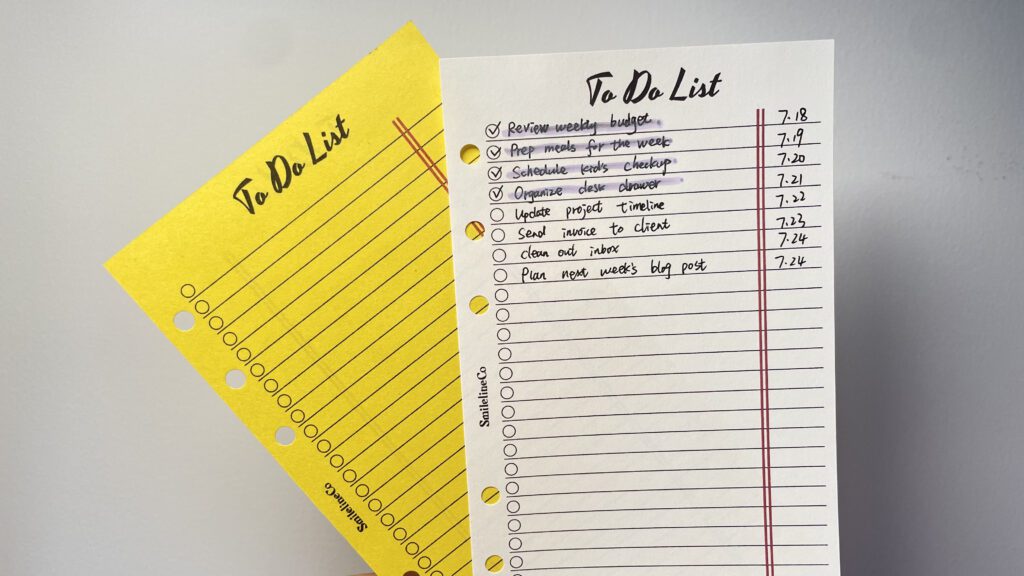
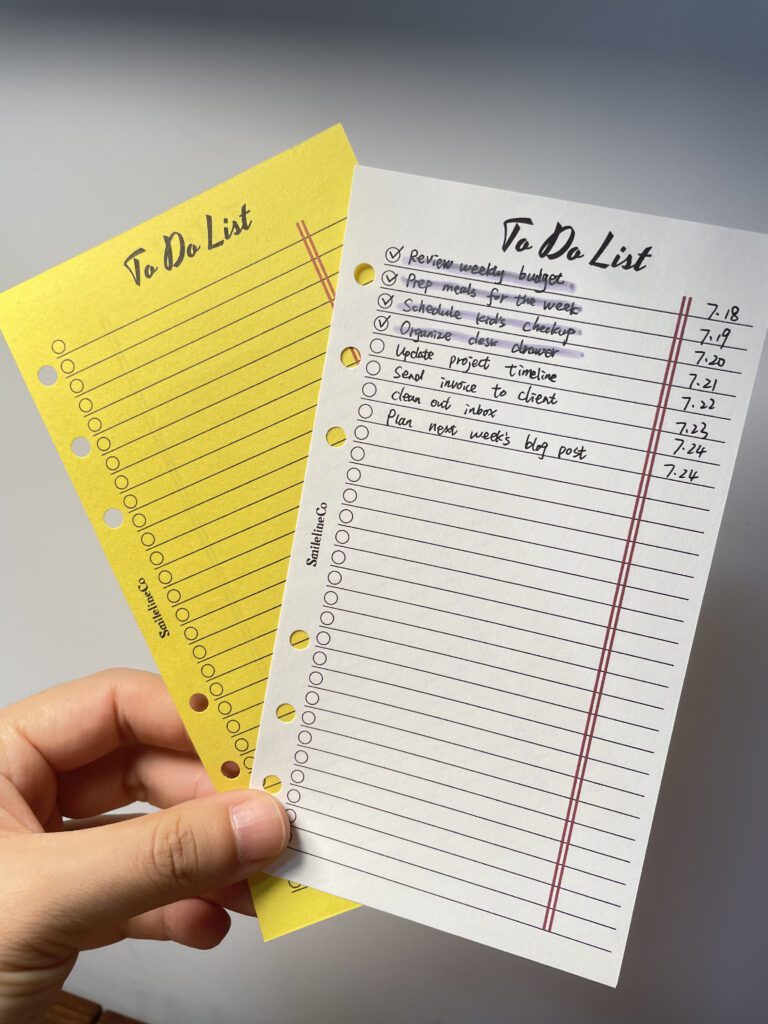
Most checklists over-design themselves — categories, time blocks, priority stars, little icons. All of that sounds helpful until it’s 11 p.m. and you don’t have the energy to sort your tasks into the “right” section. So I stripped it down: a simple lined layout, a circle to check off, and a thin red double margin running down the right side.
free_画板-1-18-722x1024.jpg)
free_画板-1-17-722x1024.jpg)
That red margin wasn’t decoration. It’s there so you can jot a quick date, a time, or a one-word tag next to any task without it competing with the task itself — the way I use mine, I’ll write the date a task is due right in that margin, so at a glance I know what’s overdue and what’s not. No extra column headers, no extra thinking. Just a little breathing room built into the page.
The result is a minimalist to-do list design that leans into a classic notebook-style layout — clean lined space, simple checkboxes, nothing fighting for your attention. It’s available as a printable checklist template in A4, A5, and Personal size, so it slides right into whatever planner binder or ring system you’re already using.
Download the To Do List printable (Free, all 3 sizes)
Who This Actually Works For (Based on Actually Using It)
I’ve handed this format to enough people in my own life to notice a pattern in who it clicks for:
1.Parents drowning in small logistics — a daily to-do list for moms works because it catches the mental load (permission slips, appointments, “did I ever call the dentist back”) before it turns into 11 p.m. panic.
2.Anyone managing ADHD or a scattered brain — a to-do list for ADHD gives your brain something external and visual to lean on, which is honestly just easier than trying to hold an entire day in your head.
3.Freelancers and self-employed folks — a self-employed daily checklist keeps client work, invoices, and the fifty small admin things from turning into one giant, anxiety-inducing blob.
4.Students — a to-do list for students breaks a scary big deadline into today-sized chunks that don’t feel impossible.
5.Anyone who’s tired and over it — if your current setup feels more like a to-do list for an overwhelmed schedule than an actual solution, going back to a lined page might genuinely be the relief you didn’t know you needed.
Personally, I also use mine as a hybrid grocery list and to-do list on weeks when my brain has zero capacity to keep two lists straight — it just goes on one page, no shame.
How I Actually Use Mine (No Overthinking Required)
I want to be honest: there’s basically nothing to “learn” here, which is kind of the point. This is roughly the four-step version of what I do most mornings.
Brain dump first, sort later. Set a timer for five minutes and write down everything lingering in your head — undone, half-done, or just worrying you. Don’t prioritize yet.This step alone does most of the work of getting a cluttered mind list out of your head and onto paper.
Circle your 3–5 non-negotiables. Look back over the dump and pick the handful of tasks that actually have to happen today. I used to write my whole week onto one page and then feel like a failure by 2 p.m. — don’t do that to yourself. Fewer, finishable tasks beat a long list you’ll never clear.
Use the margin for dates or context. That thin red column on the right isn’t just for decoration — jot a due date, a rough time, or a quick tag (work / home / errand) so you can scan the page and know what’s urgent without re-reading every line.
Cross things off as you go, and let the rest roll forward. Don’t wait until the end of the day to update your list — checking things off in real time is what makes the habit feel good enough to repeat. Whatever’s left at day’s end just moves to tomorrow’s fresh sheet. No guilt, no carrying it forward in your head.
That’s genuinely it. No onboarding video required.
Questions People Actually Ask Me About This
What’s the best format for a daily to-do list?
Honestly, the best format is whatever one you’ll actually open again tomorrow. In my experience, a simple lined layout with checkboxes beats an elaborate, multi-section template almost every time, because there’s no thinking involved — you just start writing. Whether you prefer the A5 to-do list printable for a smaller binder or a full A4 sheet for more writing room, pick whatever doesn’t require a learning curve.
How do I use a printable to-do list effectively?
Fill it in at roughly the same time each day, keep it realistic (five to ten items, not thirty — I learned this the hard way), and put your top priorities near the top so they get done even if the day goes sideways. Keep the page visible — in your binder, on your desk, wherever you’ll actually see it — and start a fresh sheet every few days rather than treating it as one endless running list.
Is a to-do list good for ADHD?
In my experience, yes. Writing tasks down externally takes the pressure off trying to remember everything, and there’s something about the physical act of checking a box that just works better than a phone notification you swipe away without reading. There’s no “right” way to fill it in — arrange tasks however makes sense to your brain that day.
What size should I print my to-do list in?
Depends on where it’ll live. A4 is great as a standalone desk sheet. A5 slots neatly into a standard ring binder or planner. Personal size is the move if you’re the type who carries a smaller planner around with you all day. All three sizes share the same clean, lined layout.
Can I reuse a printable to-do list every day?
Yep — it’s a printable PDF, so you can print as many as you want. I just keep a little stack by my coffee maker and grab a fresh one whenever I need it. Some people laminate one page and use dry-erase markers instead, but most of us prefer fresh pages, since old ones end up as a nice little record of what actually got done.
Looking for More Systems Like This?
A to-do list is a great place to start, but it’s really just the front door. Once the daily habit sticks, it’s natural to want it connected to the bigger picture — your budget, your goals, your home — instead of starting from scratch every time you want to track something new.
Better systems, better days — that’s the whole idea behind SmilelineCo.
Looking for more free printables? Browse the [Free Printables Library →] for every free download we offer, new pages added regularly.
Want a full planning system instead of a standalone checklist? The [Complete Systems →] collection bundles pages like this one into something bigger, designed to work together across your whole routine — and you can browse everything directly in our [Shop →].
Setting up your own printing station? Our [Printing & Planner Supplies →] page has the exact printer, paper, and tools we use to go from PDF to finished page.
What sets SmilelineCo printables apart?
Most printables are either pretty or practical , rarely both. I try to close that gap. Every insert starts as a real system I use myself to run my own life and business, then gets refined until it’s something I’d actually want to look at every day. I’m a designer first, so whether a printable is free or paid, it’s built to print sharp and clean on a home printer, not just look good on a screen. And I make everything myself , no outsourced templates, no shortcuts. This is a one-person shop, and every page carries that.
Is this printable free to download?
Yes ! This one is 100% free for personal use. I share free printables because I know what it feels like to want a little more structure in your day without having to pay for it first. If a simple page like this makes your planner (or your year) feel a little more together, that’s exactly what it’s for.
All printables are for personal use only.
Yes. This printable, along with the graphics, layouts, and designs on SmilelineCo, is for personal use only. Please don’t edit the files, resell them, or re-upload them anywhere else , if you’d like to share it with someone, just send them the link to this post instead. If you’d like to use it for a classroom, workshop, or small group setting, that’s totally fine too , just keep the files unedited and don’t sell or re-host them, and a link back here is always appreciated.
What’s the best way to print these printables?
For best results, I recommend printing on standard A4 paper using your printer’s normal settings. These are designed as high-resolution PDFs, so they’ll stay crisp and clear on any printer , inkjet or laser. Simply download the PDF, open it, and print. If your printable requires trimming or folding, I’ll always include those specifics in the blog post itself, since exact sizes can vary from product to product.
If you’re printing on cardstock or heavier paper, just double-check your printer settings can handle the paper weight , most home printers are fine up to 120–160gsm.
As always, if you make this your own — different colors, added stickers, whatever works for you — I’d love to see it. Happy planning!
Other statements
Affiliate Disclosure Some links in this post are affiliate links, meaning I may earn a small commission if you make a purchase through them — at no extra cost to you. I only link to products I actually use and recommend myself. This helps keep the free printables coming, so thank you for supporting SmilelineCo this way.
Blog Content & Copyright All written content, photos, and graphics on this blog (SmilelineCo) are original and copyrighted. Please don’t copy, reproduce, or republish blog text or images elsewhere without written permission. If you’d like to reference or share something from a post, a link back to the original post is always welcome and appreciated.
General Disclaimer The tips, tools, and printables shared here are based on my own personal experience and are intended as general guidance only , not professional advice (financial, medical, legal, or otherwise). Please use your own judgment and consult a qualified professional where appropriate.