Free App Subscription Tracker Printable. Stop Forgetting What You’re Paying For
Do you actually know how much you’re spending on subscriptions every month?
Most people don’t.
Netflix, Spotify, Amazon Prime, Canva, iCloud, ChatGPT, Claude, Duolingo Plus. they all seem small on their own. But add them up, and you might be shocked at the number staring back at you.
If you’ve ever been surprised by a renewal charge, paid for an app you forgot you had, or meant to cancel something “next month” for the past six months, this post is for you.
The Subscription Trap Nobody Talks About
Here’s the thing about subscriptions: they’re designed to be forgettable.
Small monthly charges. Auto-renewals. Free trials that quietly flip to paid. It’s not an accident. It’s how the business model works.
And for busy moms, parents juggling family finances, or anyone trying to get a handle on their spending, these silent little charges add up fast.
I’ve been there. I once discovered I’d been paying for a meditation app for eight months — an app I’d opened exactly twice. That was the moment I decided I needed a system.
The Simple Fix: A Paper Tracker You Can Actually See
I tried spreadsheets. I tried apps (yes, I’m aware of the irony). Nothing stuck.
What finally worked was something physical. A printed page I could actually look at, write on, and keep in my planner.
So I designed one. And I want to give it to you for free.
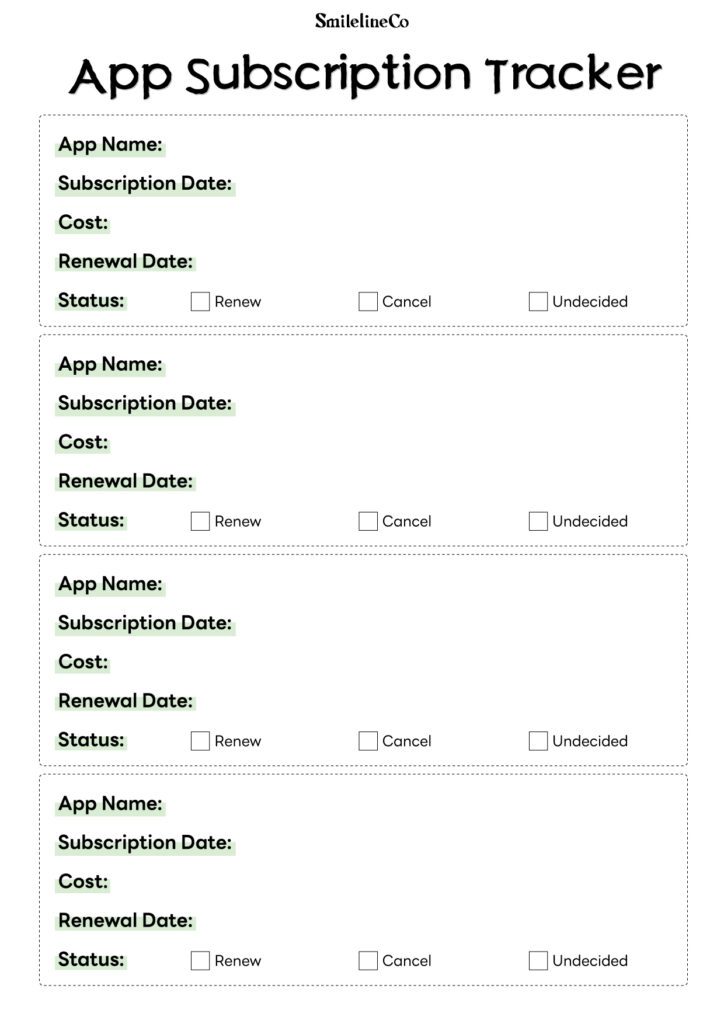
Introducing the Free App Subscription Tracker Printable
This simple one-page tracker helps you:
①Log every subscription in one place
②Track the app name, subscription date, monthly or annual cost, expiry date, and renewal status
③See at a glance what’s active, what’s expiring, and what you should cancel
④Stay in control of your monthly spending, without opening another app
It’s clean, minimal, and designed to fit inside your existing planner.
Available in three sizes:
A4 / A5 / Personal Size
How to Use It
Step 1: List every subscription you currently have
Go through your bank statements or email inbox and write down every recurring charge. You might be surprised how many there are.
Step 2: Fill in the details
For each subscription, write down the app name, how much you’re paying, when you subscribed, and when it renews.
Step 3: Check the status
Mark each one: are you keeping it, cancelling it, or still deciding?
Step 4: Review monthly
Set a reminder once a month to review your tracker. Cancel anything you’re not using. It takes five minutes and could save you hundreds a year.
Download Your Free App Subscription Tracker
Ready to see exactly what you’re paying for?
👉 Click here to download your free App Subscription Tracker
(Available in A4, A5, and Personal Size, instant download, no signup required)
Print it out, pop it in your planner, and take back control of your subscriptions.
What You’ll Need to Print It
To get the best results, here’s what I recommend:
Paper:
A5 or Personal size planners work best with slightly thicker paper, 100gsm or above holds ink better and feels nicer to write on.
👉A5 Blank Paper, 120 GSM, 6-Hole Punched
👉A5 Blank Paper, 160 GSM, 6-Hole Punched
👉A4 Sheets White Paper Textured 120gsm Suitable for Inkjet Printers
👉A4 Blank Paper, 120 GSM
👉Personal size 3.75” x 6.75” 100gsm Blank, 6 Holes Punched
👉Personal size 3.75” x 6.75” 100gsm Blank, 6 Holes Punched
Printer:
Inkjet or laser printer works. If you don’t have one, you really like these little pages, and you might eventually own your own printer.
👉Canon PIXMA TS4320
👉Canon PIXMA TS7720
👉Epson Expression Home XP-5200
👉Epson EcoTank ET-2800
Planner or Binder:
This tracker is designed to slip right into an A5 or Personal size ring binder or planner.I’ll also recommend a few binders that I think are pretty good.
👉A5 Leather Binder Notebook
👉A5 Binder Refillable Planner
👉A5 Rings Planner
👉A6 Binder
👉A6 Vintage Leather Journal
Hole Punch:
If you’re printing A4 and trimming down, a small handheld hole punch makes life easier.
👉Paper Puncher for A5 Size Six Ring Binder Planners
👉6-Hole Paper Puncher, A5 A6 A7 6 Ring Punch with Positioning Mark
👉Metal Adjustable 6 Hole Punch for A5 A6 A7 Binders/Planners
👉Adjustable 6 Hole Punch Mini/Pocket A3/ A4 / A5 / A6
One Small Page. One Big Shift.
You don’t need a complicated budgeting system to stop wasting money on forgotten subscriptions.
You just need one page, a pen, and five minutes.
Download your free App Subscription Tracker today, and finally see exactly where your money is going.
👉 Download Free App Subscription Tracker
Looking for more free printables? Browse the [Free Printables Library →] for every free download we offer, new pages added regularly.
Ready to build a full system instead of a single page? The [Complete Systems →] collection bundles trackers like this one into something bigger, designed to work together across your whole routine.
And if you’re setting up your own printing station, our [Printing & Planner Supplies →] page has the exact printer, paper, and tools we use to go from PDF to finished page.
What sets SmilelineCo printables apart?
Most printables are either pretty or practical , rarely both. I try to close that gap. Every insert starts as a real system I use myself to run my own life and business, then gets refined until it’s something I’d actually want to look at every day. I’m a designer first, so whether a printable is free or paid, it’s built to print sharp and clean on a home printer, not just look good on a screen. And I make everything myself , no outsourced templates, no shortcuts. This is a one-person shop, and every page carries that.
Is this printable free to download?
Yes ! This one is 100% free for personal use. I share free printables because I know what it feels like to want a little more structure in your day without having to pay for it first. If a simple page like this makes your planner (or your year) feel a little more together, that’s exactly what it’s for.
All printables are for personal use only.
Yes. This printable, along with the graphics, layouts, and designs on SmilelineCo, is for personal use only. Please don’t edit the files, resell them, or re-upload them anywhere else , if you’d like to share it with someone, just send them the link to this post instead. If you’d like to use it for a classroom, workshop, or small group setting, that’s totally fine too , just keep the files unedited and don’t sell or re-host them, and a link back here is always appreciated.
What’s the best way to print these printables?
For best results, I recommend printing on standard A4 paper using your printer’s normal settings. These are designed as high-resolution PDFs, so they’ll stay crisp and clear on any printer , inkjet or laser. Simply download the PDF, open it, and print. If your printable requires trimming or folding, I’ll always include those specifics in the blog post itself, since exact sizes can vary from product to product.
If you’re printing on cardstock or heavier paper, just double-check your printer settings can handle the paper weight , most home printers are fine up to 120–160gsm.
As always, if you make this your own — different colors, added stickers, whatever works for you — I’d love to see it. Happy planning!
Other statements
Affiliate Disclosure Some links in this post are affiliate links, meaning I may earn a small commission if you make a purchase through them — at no extra cost to you. I only link to products I actually use and recommend myself. This helps keep the free printables coming, so thank you for supporting SmilelineCo this way.
Blog Content & Copyright All written content, photos, and graphics on this blog (SmilelineCo) are original and copyrighted. Please don’t copy, reproduce, or republish blog text or images elsewhere without written permission. If you’d like to reference or share something from a post, a link back to the original post is always welcome and appreciated.
General Disclaimer The tips, tools, and printables shared here are based on my own personal experience and are intended as general guidance only , not professional advice (financial, medical, legal, or otherwise). Please use your own judgment and consult a qualified professional where appropriate.